
HP Spectre x360 Review: Is It the Best 2-in-1 Laptop for Professionals in 2026?
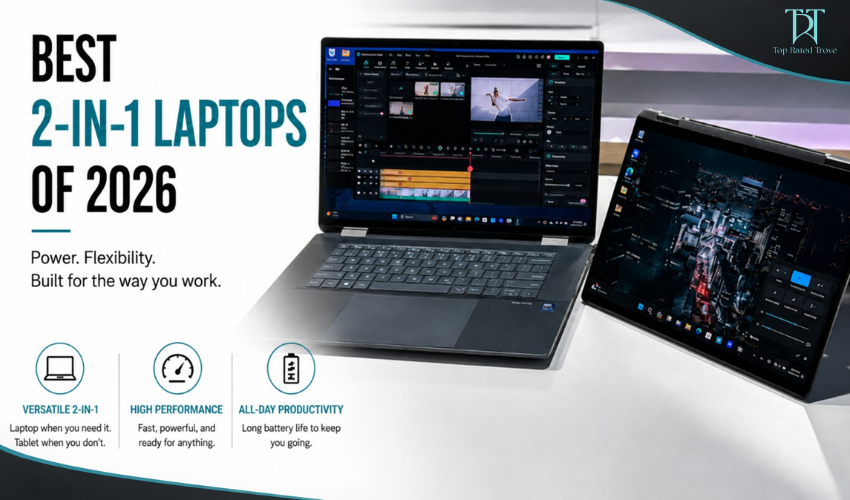
If you’re looking for a detailed HP Spectre x360 review, you’re probably trying to figure out whether this premium 2-in-1 laptop is actually worth the investment or just another stylish ultrabook. The HP Spectre x360 has long been positioned as a high-end Windows device for professionals, creatives, and power users who want flexibility without sacrificing design. The honest reality is simple: it is powerful enough for most professional workloads, but it is not designed to compete with high-performance workstation laptops. Let’s break it down in detail.
Design & Build: Premium in Every Detail
One of the strongest aspects of the HP Spectre x360 is its design. The laptop features a CNC-machined aluminum body with a polished premium finish that immediately gives it a luxury feel. Its slim profile, lightweight build, and signature gem-cut edges make it stand out in any professional environment.
Unlike standard laptops, the HP Spectre x360 is designed to feel like a premium lifestyle device as much as a work machine. It looks equally at home in a corporate meeting or a creative studio. The key takeaway is simple: if appearance and professional presentation matter to you, this laptop delivers at a very high level.
2-in-1 Flexibility: Real Productivity Advantage
The 360-degree hinge is one of the defining features of this device. It allows the laptop to switch between multiple modes depending on your workflow. In traditional laptop mode, it functions as a standard productivity machine. In tablet mode, it becomes useful for note-taking, sketching, or presentations. In tent or stand mode, it is ideal for media consumption or collaborative work.
This flexibility is not just a design gimmick it genuinely improves productivity. It is especially useful for presentations, remote meetings, and creative tasks where interaction matters more than typing.
Display: One of the Best in Its Category
The display is another major highlight in this HP Spectre x360 review. Most configurations feature high-quality OLED panels with sharp resolution, often reaching 2.8K or higher. This results in extremely crisp visuals, deep blacks, and vibrant colors. The display quality makes a noticeable difference for designers, content creators, and professionals who work with visual material. Whether you’re editing images, watching content, or working on presentations, the screen delivers a premium visual experience. In short, it is one of the strongest displays available in a Windows 2-in-1 laptop.
Performance: Strong, But Not a Workstation
The HP Spectre x360 is powered by Intel Core Ultra processors, typically paired with 16GB to 32GB of RAM and fast SSD storage. This makes it a strong performer for everyday professional tasks. It handles multitasking, office applications, web-based tools, coding, and light creative work with ease. For most business users and students, performance feels smooth and responsive.
However, it does have limitations. Heavy video editing, 3D rendering, and high-end gaming are not its strengths. The integrated Intel Arc graphics are efficient but not designed for demanding GPU workloads. The key point is simple: this is a productivity-focused machine, not a performance workstation.
Battery Life: Reliable for Full Workdays
Battery performance is one of the stronger areas of the HP Spectre x360. In real-world usage, it typically delivers around 9 to 11 hours depending on workload and brightness settings. This makes it suitable for full workdays without needing constant charging, which is essential for professionals who travel or work remotely. Fast charging support also helps reduce downtime when the battery does run low.
Keyboard, Touchpad & Usability
Usability is another area where the Spectre x360 performs well. The keyboard is comfortable and well-spaced, making it ideal for long typing sessions. The touchpad is large and responsive, although some users occasionally report minor inconsistencies depending on the model. The device also supports stylus input, which is useful for designers, students, and professionals who prefer handwritten notes or sketches. Overall, the user experience feels polished and productivity-focused.
AI & Smart Features: Modern Productivity Tools
Newer versions of the Spectre x360 integrate AI-based features to enhance productivity. These include AI-enhanced webcams for better lighting and noise reduction during video calls, as well as integration with Windows Copilot for smart assistance. These features are particularly useful in remote work environments, helping improve communication quality and workflow efficiency without requiring additional tools.
Pros & Cons
Who Should Buy the HP Spectre x360?
The HP Spectre x360 is ideal for professionals, business users, and creatives who value portability, design, and flexibility. It is especially well-suited for office work, presentations, content creation, and multitasking. It is also a great choice for students who want a premium device for note-taking and productivity, although the price may be high for budget-conscious buyers. However, it is not ideal for users who need high-end performance for 3D rendering, heavy video editing, or gaming workloads. In those cases, a dedicated workstation laptop would be more appropriate.
Final Verdict: A Premium Productivity Machine
After this complete HP Spectre x360 review, the conclusion is clear. The laptop is not designed to be the fastest or most powerful machine it is designed to be one of the most refined and versatile productivity laptops available. It successfully combines premium design, strong everyday performance, excellent display quality, and flexible 2-in-1 functionality. For professionals and creatives, it is a highly capable and polished device. If you want maximum performance, there are better workstation options. But if you want a premium, flexible, and professional-friendly laptop, the HP Spectre x360 remains one of the best choices in 2026.
FAQs
Is HP Spectre x360 good for work?
Yes, it is designed for productivity, business tasks, and multitasking.
Is HP Spectre x360 good for students?
Yes, especially for note-taking and portability, but it is relatively expensive.
Can HP Spectre x360 handle video editing?
Light editing is fine, but heavy professional editing is not ideal.
Is HP Spectre x360 better than MacBook?
It depends. Spectre offers 2-in-1 flexibility, while MacBook offers stronger raw performance.
Is HP Spectre x360 good for gaming?
No, it is not designed for gaming or GPU-heavy tasks.
At Topratedtrove, we are dedicated to helping you shop more intelligently, spend more judiciously, and find superior value online. Regardless of whether you are a student, a parent, a fashion enthusiast, or just a sensible shopper, we link you to dependable savings opportunities and trustworthy buying options from your preferred brands across the globe
Subscribe
Sign up below to receive money-saving tips, frugal ideas, family-friendly recipes, and more.